
Enter your page URL to check your meta title and meta description length and see how it looks on search engines.

Poorly written titles and meta descriptions may affect your website’s discoverability for potential visitors and search engines. Moreover, not having metadata permits the search engine to pick any seemingly relevant part of the page and apply it automatically as meta title and description.
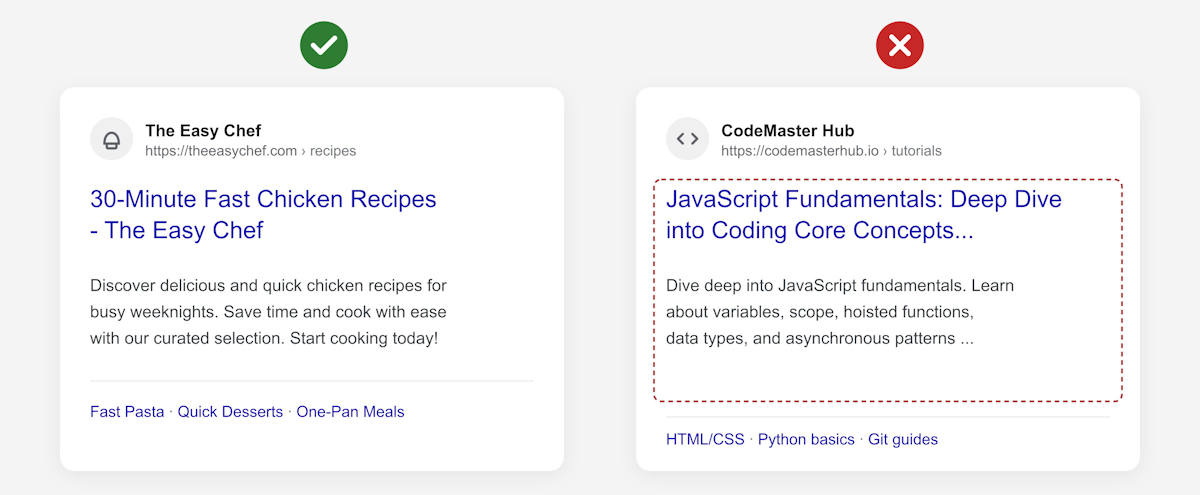
Just as important is the length. If the metadata exceeds the recommended character count, it can get cut off by Google and other search engines. This weakens how your search engine listing looks to users who are deciding whether to click.
The TinyIMG meta title & description checker helps you preview how any page's search listing actually appears. Enter the URL you want to check, and the tool will instantly show you what’s too long, too short, or missing entirely – and how to fix it.
A meta title, also known as a title tag, is an HTML element that defines the content of a web page. The element is typically displayed as a clickable part of a search engine result, and it’s meant to help both your potential site visitor and the search engine get an idea of what your page is about.
A meta description is an HTML element that consists of a brief web page summary. It’s displayed in your search engine result under the clickable meta title. It also works as a call to action that encourages potential visitors to follow suggested actions.
You can add meta titles and meta descriptions to your website using the SEO settings in your website builder, a plugin, or a third-party app like TinyIMG on Shopify.
Here’s a general guide on how to add SEO metadata to your site:
<title>Your meta title text.</title><meta name="description" content="Your meta description text.">